.png)
How to fix Samsung Dryer Error Codes Issue in 2025?
- appliancecarecapit
- Sep 11, 2025
- 2 min read
Samsung dryers are efficient and technologically advanced, but like any appliance, will occasionally flash error codes when there is an issue. They are designed to make it easy for you to see what the problem is. If you ever catch one flashing on your dryer's screen, don't worry—it's usually an easy fix at home. Below are the most popular Samsung dryer error codes and easy steps you can follow to solve them.
Error Codes in Samsung Dryer:
Door-Related Errors (dC, dE, dF, do, d0, 1DC, 1dF) - covering door latch and closure issues
Temperature Control Issues (tC, tE, t0, t5, 1tC, HC, hE) - addressing overheating and sensor problems
Voltage Problems (9C1, 9E, 2E, 9E1) - explaining electrical supply issues
Jammed Button Errors (bE, bE2, bC2, 6E, 6E2, 6C2) - covering stuck control panel buttons
1. HE Error Code:- Typically, the dryer's HE code indicates improper heating. A blocked vent, a clogged lint filter, or a problem with the heating element could be the cause of this.

How to fix this:
Thoroughly clean the lint filter.
Look for kinks or obstructions in the vent hose.
Verify that the dryer is receiving enough airflow.
When to Call Us: If the issue continues, the heating element or thermostat may need repair. Our team at Capital Appliance Care can diagnose and fix the problem quickly. 2. Error Code tS or tO (Temperature Sensor). These codes suggest a temperature sensor issue. Fix at Home:
Reset the dryer by unplugging it for a few minutes.
Clean the vent and lint filter.
When to Call Us: If the code persists, the sensor likely needs replacing. Capital Appliance Care technicians can replace faulty sensors safely and efficiently. 3. Error Code dE (Door Error). The dryer door isn’t closing properly. This could be due to clothing stuck in the door, lint buildup, or a faulty latch.
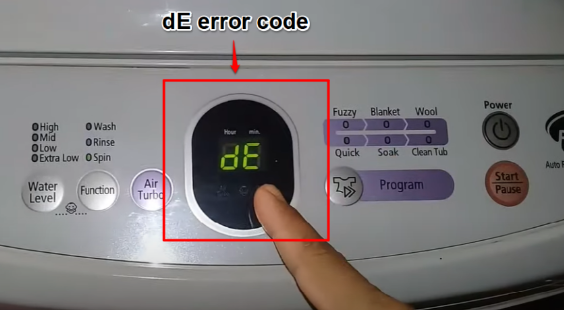
Fix at Home:
Open and close the door firmly.
Remove any fabric or lint blocking the latch.
When to Call Us: If the door switch is defective, our repair experts can replace it with genuine parts. 4. Error Code FE (Power Supply Error)
This code points to a power supply problem, often linked to a surge or voltage issue. Fix at Home:
Unplug the dryer for a few minutes, then restart.
Test the outlet with another appliance.
When to Call Us: If the outlet or wiring seems to be the issue, Capital Appliance Care can arrange safe and reliable service. 5. Error Code bE (Button Error). This error happens when a control panel button is stuck. Fix at Home:
Press each button gently to check for jams.
Wipe the control panel with a dry cloth.
When to Call Us: If the panel is faulty, our technicians can replace or repair it to restore smooth Verdict: Basic checks can resolve many Samsung dryer error codes, but if the code persists, professional repair is required. Our specialty at Capital Appliance Care is providing reliable, prompt dryer repair services. Our knowledgeable technicians offer long-lasting fixes for everything from malfunctioning sensors to heating problems, so you can easily resume your daily schedule.
Do you need assistance with your Samsung dryer?
Make an appointment for service with Capital Appliance Care right now, and we'll handle the rest.

Comments